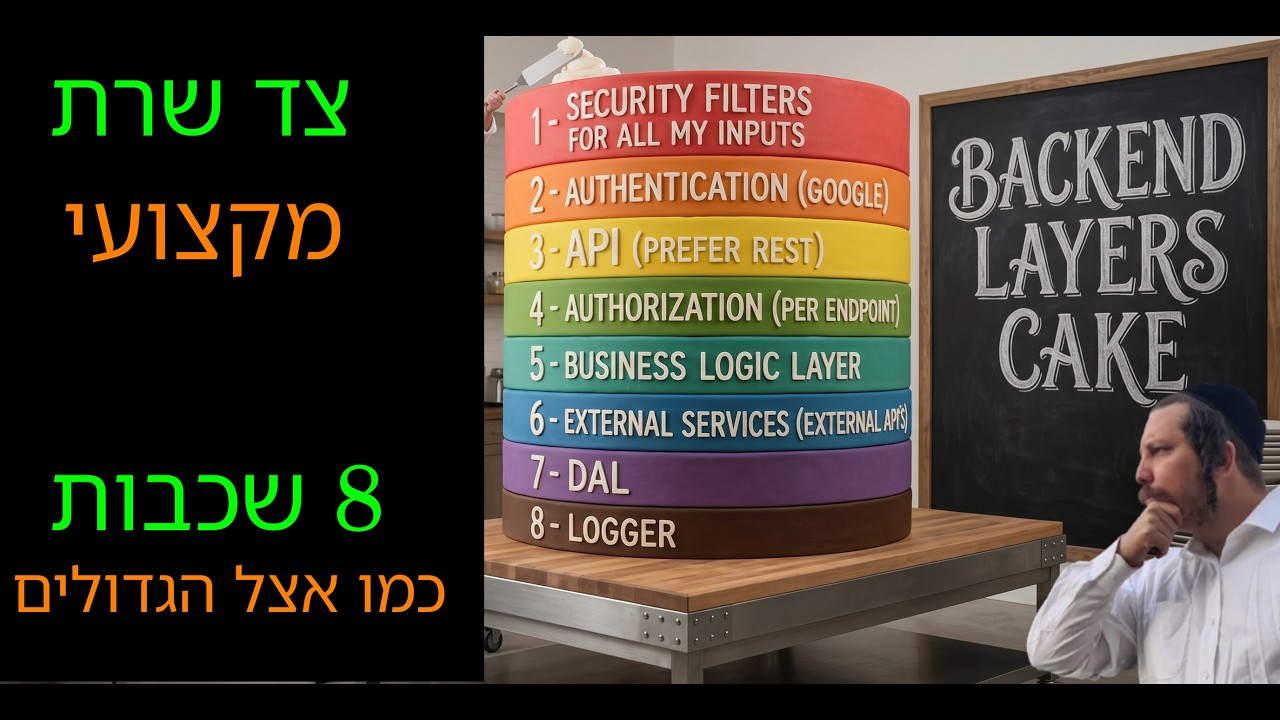
The frontend is planned. The database is planned. Now comes the part in the middle that has to talk to both: the backend. In this lesson from Ariel’s no-code course, where the class is building a giraffe meme generator, nobody writes code. Ariel gives Claude Code one carefully layered prompt, lets it design the whole backend schema, pushes back on exactly one decision, and then shows you which parts of the result are worth your time.
One prompt, eight layers
As always, the prompt starts with “read the main spec first”. Then: build me a schema for the backend. Not the backend itself. “We are not building anything yet.”
The rest is a checklist of the layers covered in the previous lesson:
- Language: Python.
- Keep it minimal: as simple as possible, as few frameworks, libraries, plugins and installations as possible.
- Input filters: a layer that checks everything coming in.
- Authentication: identity through Google.
- API: prefer REST, a standard for building APIs that has proven itself for many years.
- Authorization: permissions per endpoint. An API is a list of actions you can perform, each action is an endpoint, and each one gets its own permission check.
- Business logic.
- External services: there are none yet, but the next lesson adds OpenRouter plus one fun extra service.
- DAL, the data access layer that talks to the database.
- Logger: there are five log levels. Every function gets a try/catch, meaning “run the code, and if there is an error, catch it instead of crashing the app”. Every function gets at least one debug line at the start, and plenty of logging overall, so problems are easy to trace later. But start with the minimum level set to warning, so the log does not explode for no reason.
And the closer: think of more layers yourself. “I want my application at production level: secure, professional.” Write it to a doc and reference it from the spec.
A small practical moment: the keyboard shortcut for the VS Code terminal did nothing, because Ariel’s keyboard was set to Hebrew. If your console gets cluttered, it is cls on Windows and clear on Linux.
The questions Claude asks
Claude reads the file, checks the existing schemas, and starts asking. Since the app is a website, it proposes web infrastructure, which, Ariel notes, is “sort of no choice”. It offers three options for the Python web framework: one built around OpenAPI docs that it calls a great fit for AI work, Flask as the more basic option, and a third Ariel admits he does not even know. Playing the role of someone who has no idea, he takes the recommended option, the same move used throughout the course. If you are more technical, he says, you can google the comparison. He also thinks the question was a bit unnecessary.
What the plan looks like
Claude lays out the stack: security, API, authentication, authorization, business, external services, DAL, database. Running along the whole path: the logger, config, error handling, and background jobs. An HTTP request, for the record, is what happens when your browser calls the server.
Then a big file structure. Ariel’s advice is not to dig into every file but to notice the shape: large, well divided, with notes about what goes where. Even without knowing what each file does, you can see it is organized. Along the way: POST means create and GET means retrieve. Authentication runs through Google with JWT tokens (a JWT is a token) refreshed every 15 minutes. The meme creation flow starts by validating the input, then deducting a credit, then the rest.
The one thing he sent back: the DAL
Here is the catch. Claude wrote “no ORM”. An ORM is a generic way of saying “give me item 3 from table X, or item 4 from table Y”, where everything goes through the same mechanism. Claude went the opposite way: an explicit DAL function for every single operation, each one plain SQL, on purpose, because it is easier to debug and it matches the “be minimal” instruction.
Ariel’s verdict: for a small app, that is honestly fine, maybe even better. But this example is supposed to scale to something massive, and some students may want to build a very, very big app. So he writes back: everything looks great, but I do not like the DAL. I want a production-level DAL, as if this were a huge application, with a smart generic DAL.
Claude rebuilds it with a repository pattern plus a unit of work, and stresses one rule: the logic layer never writes SQL directly. Everything goes through the DAL. Repository, service, factory: these are the patterns large applications use to keep data access safe and protected from problems.
The phone line rule
Ariel finds it funny that Claude writes as if it had just discovered the correct way to work with databases. The idea, from very high up: the database is a closed box. Your software opens a connection to it, like an open phone line. Unless you configured it otherwise, that line handles one conversation at a time, and everyone else calling gets a busy signal. So the worst thing you can do is leave it open all the time. You always open the line, ask your question, get the answer, hang up.
What to actually read
The final document adds a middleware layer on top of security and splits a couple of layers in two. For an app this small, Ariel says, that may be overkill and will only slow things down, but he is teaching how a huge app is built. If you are building a small one, tell Claude afterwards: “I am building a small app, tell me if all this is too much.”
His reading guide: skip the code. A lot of the document is not code, it is explanations of each layer and each endpoint, and those are worth reading. The exception he does recommend learning is the HTTP error codes, because when you build a web app you need to know what an error means before you ask AI about it:
- 401: you are not identified.
- 403: you are identified, but you have no permission.
- 429: too many requests. In Ariel’s words: you started attacking us, not OK.
- 500: something broke on the server.
The plan ends with how to start the system and how to shut it down.
Where this sits in the course
So far the course has covered the frontend, API and logic, the database (the previous lesson), and authentication, with error handling folded into this one. The next lesson brings in external services, covered in Adding External Services to Your App with AI. After that the class starts building, then moves on to hosting and deployment with CI/CD, and later redoes it all on cloud and compute.
🔥 Roast Corner
Let’s review the brief. “Be as minimal as possible. As simple as possible. As few frameworks and libraries as possible.” Claude, a model trained on the entire written output of humanity, does exactly that and hands back a small, clean, debuggable DAL. And the response is: “I don’t like the DAL. Make it production level, as if this were a huge application.” For a giraffe meme generator. Claude, being a professional, did what every professional does when a client changes their mind: it went all the way to the other side and came back with repositories, a unit of work and service factories. Ariel’s own description: “I told him to make a professional DAL, so he blew it up into a giant DAL.” Yes. That is what you asked for, both times.
Then there is the man with more than 30 years of coding behind him, defeated by a keyboard shortcut because his keyboard was in Hebrew. Thirty years of experience, zero years of language switcher.
And the sweetest part: Ariel’s own definition of HTTP 429 is “you started attacking us, you’re not OK,” which is more emotionally honest than the spec. The end result is a backend with eight layers plus middleware, where a single giraffe, just trying to get its meme, has to pass input filtering, Google authentication, per-endpoint authorization, the business layer and a unit of work. Even the giraffe needs a Google account now.
🤖 AI for Humans
Rogervoice, an AI captioning app founded in 2014 by Olivier Jeannel, who has been deaf since age two, just launched free in-person captioning. Until now it was mostly about phone calls; the new Live tab captions face-to-face conversations in real time, at work meetings, doctor’s appointments, the pharmacy counter, or dinner with family. You open the app, start a session, and read along in a large adjustable caption area. Afterwards you can go back to the saved transcript or export it.
The detail that matters most: in-person captioning runs on the phone itself, works offline, and the conversation never leaves the device. It supports 45 languages on iPhone and 15 on Android, and the company says it has captioned more than 12 million calls in over 100 languages. Source: PR Newswire.
It is a nice counterpoint to this lesson. We just spent a whole lesson sending everything through a server, eight layers deep, because that is how you protect secrets and payments. Rogervoice shows the other side of the architecture decision: when the data is someone’s private conversation, the most secure backend is sometimes the one that never sees it.
💬 Comments