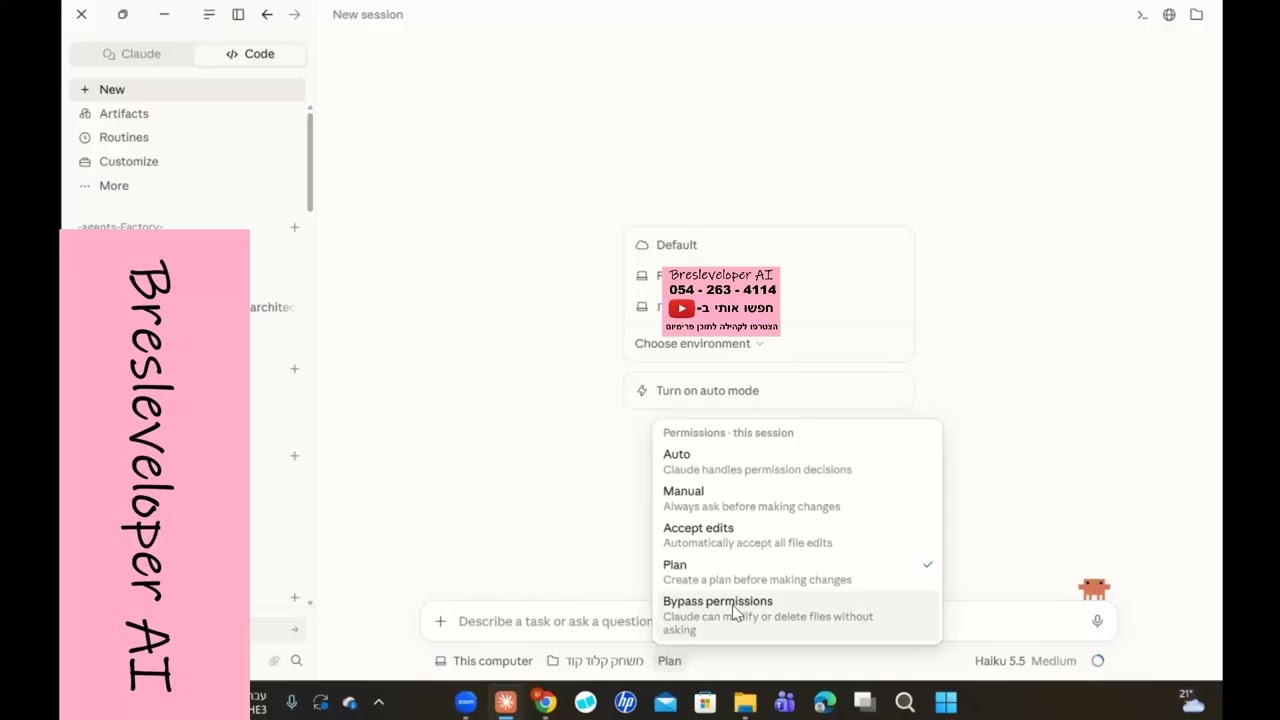
This one is a little different. The teacher is not Ariel but Shani, one of the community’s sharpest students, who got so excited about the new Claude Desktop features that she agreed to teach them on camera. Ariel and Michael, the community’s architect and designer, sit in and keep jumping in with questions, stories and side quests. Hence the title: three hyperactive people and one Claude. Underneath the chaos is a really solid beginner lesson on how to work with Claude Desktop safely and well.
Step one: give Claude its own folder
The first thing Shani learned, and the first thing she teaches: open a dedicated folder for working with Claude, and inside it a separate folder for every project. Nothing important lives there, only Claude’s projects. Everything Claude needs is in that folder, and it does not wander around the rest of the machine.
Ariel explains why this works. The moment you pick a directory for a conversation (in Claude Desktop, in Claude Code, in Cursor and most similar tools), that directory becomes, in quotation marks, its sandbox. It cannot leave unless you give it bypass permissions and tell it to. In the new-chat screen you choose the environment (this computer, or a cloud or sandbox environment you configured) and then the folder. Shani’s tip: always check you are in the right one, because sometimes there are two with similar names.
He also adds a useful mental model. There is the AI, and there is the software. The software sends information to the AI, like a phone call, and the AI answers with instructions such as “go do this”. But the AI does not own the software unless you gave it permission. He compares the scary headlines about agents misbehaving in labs to being afraid of a soldier who just came back from combat: in training, the agents are in an action state; on your machine, they sit inside very strict software, with the weapon unloaded.
The permission modes, from careful to “do whatever comes to mind”
- Manual: every single action needs your explicit approval.
- Accept edits: writing and editing files is automatic; anything more advanced, like installing software or running code it built, it asks you first.
- Auto: Claude takes the task, works out what to do and keeps going until it reaches something dangerous or irreversible, like deleting something, and then stops and asks. Small local things, like installing a Python package inside the project folder, it just does.
- Plan mode: Shani’s recommendation for beginners. Claude asks questions and plans, and executes nothing until you say so.
- Bypass permissions: Claude does whatever it decides. Only when you really know what you are doing.
Shani has a war story here. Before she joined the community she saw a video about loops, planned a fitness app for someone from her gym, put the plan on bypass, told Claude to loop through all the phases, and left automatic credit top-up on “for safety”. Then she went for a walk with the dogs. Four receipts arrived by email. When she got home, it had barely finished one phase and had sent what felt like a thousand agents to work on the same thing.
Ariel’s correction is the useful part: that was not a bypass problem. That was extra usage plus a loop that keeps going until it succeeds, with a credit card attached. The real danger of bypass is different. Ask it to fix a Windows bug, and it may decide the fix is deleting a system file. In bypass it just does it; in auto it stops and asks whether that serious action is allowed.
Which model, when
- Haiku is the small, fast one: quick checks and questions with a clear yes/no answer, like a fast pass over code that returns true or false.
- Sonnet is the house model, the central one, excellent at most tasks.
- Opus is the deep thinker: a reasoning model whose default is deep thinking even at the lowest effort, with a broader view.
Most labs follow a similar pattern, Ariel adds: a full model (often called Pro) and a faster, weaker optimized version (often called Flash), sometimes with an even lighter tier. The names do not matter; the roles do.
Shani’s own workflow is the best part of this section. She does the specification with a medium model, because gathering requirements and documenting decisions does not need a giant brain. She plans with a strong model, turning the spec into an execution plan. Then she sends the plan to the biggest model she has and tells it: read the plan and trash me, find flaws, security gaps, things we did not think about. In a recent project that review caught colliding database permissions in her migrations, the kind of thing where a permission exists but is not actually applied. She then takes the findings back to the planner to fill the gaps, and asks it to explain every solution, why this one, and what the alternatives were.
Ariel turns it into a five-stage map, like a real company: (1) requirements, a medium model, like the project manager listening to the client; (2) planning, a strong model, the architect thinking at home; (3) review, a strong model again, the meeting where a senior colleague tears your plan apart; (4) project management, a strong model that breaks the work into tasks and takes initiative; (5) the workers, medium or even small models doing the tasks. Asked where the project’s “personality” goes, his answer: at stage two. In professional terms it is the project’s tone, and every agent, not only the manager, should keep it in mind.
On effort: if you want normal response times, stay on medium. Ariel, a self-declared max-token freak, runs the strongest model on max, where one small sentence can take 20 minutes to become a plan. That is why he runs five to seven agents in parallel and visits each one in turn.
Live demo: a workshop page built in five minutes
Shani’s prompt was deliberately short: she wants to run a Claude Desktop workshop for people who have never used Claude, so build an interactive HTML page, a kind of game, that teaches the interface, including the merged Cowork features and Claude Code inside the desktop app (not the classic black-screen Claude Code, Ariel clarifies). And before building everything, show three example screens, so she can check it understood her line of thinking.
The first design came out ugly, and she told it so. Ariel’s trick for that moment: name a reference. “Give it a level like BlackRock”, an institutional-grade presentation. The general rule that came up later: AI works well when it has something specific to compare to. Do not say “make it luxurious”, give it the product, the site, the specs. The same goes for time estimates: tell it to plan without executing and estimate how long the work will take, and it will.
What came out, on a plain medium model, was a quiz-style game with points that walks through the Claude interface:
- Chats and Projects: a project is a smart folder with permanent instructions and files, and every chat inside it already knows them. Shani’s example: a furniture business uploads its wood types, sizes, designs and prices once, and every new chat in that project designs with exactly those materials.
- Artifacts: a separate window next to the chat with a document or small app Claude built. You can edit it, share it by email or as a link, or export it as a file.
- Connectors (MCP): connect Claude to Drive, Gmail and other tools, including image and video tools, so Claude can control them. The rules on screen were exactly right: connect only what is needed, check which permissions were approved, and treat content coming from tools as information, not instructions. Shani’s habit: minimal permissions, one job per agent, for example receive an order, write a quote to Drive, and send it for her approval.
- Skills: teaching Claude a recipe. Shani’s hummus recipe: once Claude learns how she makes hummus, it makes it only her way, like a restaurant kitchen. Her real example: she corrected a PRD document over two full pages until Claude wrote sentences the way she wanted, and then told it to turn that into a skill.
- Cowork, now merged into Claude: multi-step tasks on files in a folder you choose, like reading 48 invoice files, renaming them by date, grouping by client and creating a summary spreadsheet, after you read and approve the plan. Plus scheduled tasks, like “every morning, go over my logs and tell me what is most urgent today”.
- Claude Code in the desktop app: parallel sessions, sessions that launch more agents under them, and hooks. Ariel’s example: AIs, for some reason, love purple. Instead of reminding it every time to use green, a hook adds that sentence for you automatically. There are hooks for opening a session, closing it, writing, using a tool and more.
Grill me
The session closes on a concept: grilling. Tell the agent “grill me” and it bombards you with questions until it understands exactly what you want. Ariel cites Matt Pocock’s view that the biggest gap today between what agents can do and what we get from them is communication: the agent is very intelligent, but it has no access to your brain. Asking for two or three quick screens, or a few cheap draft versions, is the visual version of the same thing. Ariel does it with video, generating five rough clips with Remotion in 20 minutes instead of burning paid credits, then looking at them to figure out what he actually wants.
Michael shares his own version from Gemini: a “strike” keyword means short and to the point, and “extended inquiry” means ask me three to five really hard questions and keep going until I say stop. Ariel’s verdict: he invented grilling on his own. And a final send-off: Michael is heading from Uman to Moldova to help the Jewish community there, and Shani’s polished, more interactive version of this guide is coming to the community courses.
🔥 Roast Corner
Let us start with the student, since she brought receipts. Literally. Shani gave Claude a plan, bypass permissions, an infinite loop and an auto-refilling credit card, and then took the dogs for a walk. That is not vibe coding. That is leaving your teenager the car keys, the credit card and a note saying “do everything, don’t stop”, then acting surprised when four receipts show up and the fitness app has done one squat. To be fair, she is in good company: a team in 2025 had two agents talk to each other in a loop for eleven days, with no errors and no alerts, until the bill reached $47,000 for a system “doing nothing useful” (Supervaize). Shani got off cheap. She just has to explain to her dogs why that walk was the most expensive in history.
Then there is the teacher, who nodded through the whole cautionary tale and then calmly announced that he runs the biggest model on max, waits 20 minutes per sentence, and keeps five to seven agents running in parallel. Ariel does not have a token budget; he has a token bonfire with a WhatsApp interface. And the AI, our brilliant reasoning machine, still could not resist making everything purple, so humanity had to invent hooks just to tell it “green, please” on every Enter.
Which leaves Shani’s job interview at a volunteer rescue organization. Asked what she does with AI, she answered: “destroying humanity”. Only one of the four volunteers laughed. The other three had clearly seen her credit card statement.
🤖 AI for Humans
For people with age-related macular degeneration (AMD) and other retinal diseases, reading a menu or a medicine label can turn into a daily fight. In early November 2026, Eyedaptic, a company that makes vision-enhancing smart glasses, fully launched Eva, an agentic AI visual assistant built into its EYE7 glasses. Older assistants mostly answer a question about what the camera sees, like reading a sign. Eva is built to work out what the wearer needs and act on it, for example adjusting the glasses’ enhancement settings by itself, so the user does not have to fight with menus or a remote. The founder, Jay Cormier, named it after his late grandmother, whose AMD inspired him to start the company.
The numbers deserve the honest framing the article itself gives them: the company’s reading and command accuracy figures (over 99% and 97%) come from its own internal testing and have not been independently validated. But independent data on the previous-generation glasses is starting to appear: in an unsponsored evaluation presented in August 2026, 17 of 19 patients with advanced retinal disease showed measurable improvement in near vision right after fitting. It is a nice echo of this lesson: an agent that gets real control over a tool, but a narrow, well-defined control, in service of one person’s everyday life. Source: Ophthalmology Times.
💬 Comments