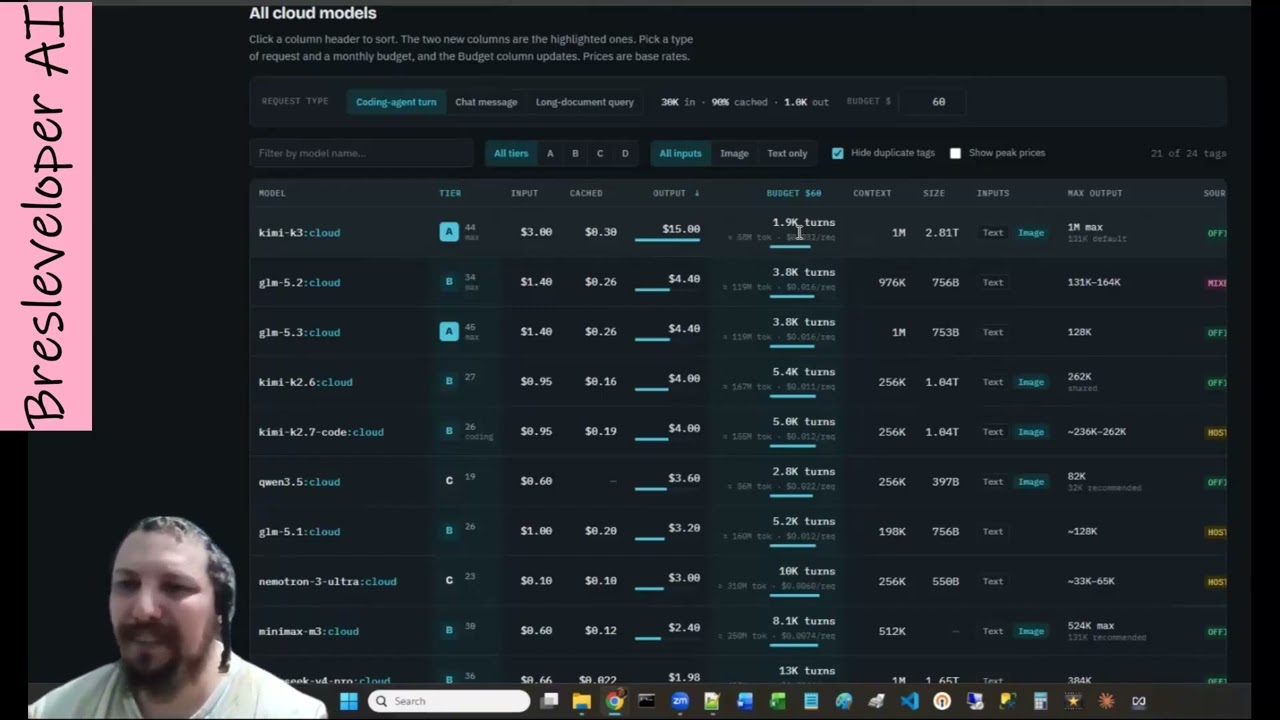
Ollama changed its cloud pricing. Instead of the old usage tiers — low, medium, high, very high — everything is now expressed as a raw monthly dollar budget. That sounds clearer, but it actually makes it harder to guess what you are getting. This video is Ariel’s attempt to translate those numbers into real usage.
What the new plans look like
- $20/month plan → $60 monthly budget
- $100/month plan → $300 monthly budget
- Teams: $500/month → $1,000 monthly budget plus advanced features
The dollar budget is what you burn with each model call. The question is: how far does it go?
Real model experiments
Ariel ran actual usage tests. The differences between models are dramatic.
- GLM-5.3: a powerful model that burned about a fifth of his weekly budget quickly. Fast, capable, expensive.
- kimi k2.7: a cheaper model that gives far fewer long answers. Still smart, but lazier — it tends to rush to an answer and stop.
- GLM-5.3-flash: almost 3,000 requests. On paper it looks cheap, but Ariel found that kimi k2.7 is even cheaper in practice, because GLM-5.3-flash works hard while kimi k2.7 rushes to finish. Still, GLM-5.3-flash tries harder to analyze problems and sits around GPT-4o level.
- kimi k3: a strong model that burned a large chunk in 12 requests. The strongest model he tested, but also the most expensive.
He also mentions GLM 5.2 / 5.3, Mistral Large / Ultra, DeepSeek V3 Pro, and Gemma 4. The heavy models (GLM 5.3, Mistral Large, etc.) give roughly 1,000 messages per week, which is about 200 per session. Smaller models stretch further but lose capability.
One extra note: GLM 5.3 Pro does not accept images — they disabled images to keep it smart and save compute. Ariel’s workaround is to spin up a GLM-5.3-flash sub-agent to look at the image, explain what is happening, and then continue the conversation in Pro.
The $60 budget reality check
Ariel asked his assistant Omri (running GLM 5.3 code at the time) to build a projection for a $60 monthly budget. The rough math:
- Per week: about 500 messages total.
- Per session: about 100 messages.
- In normal chat: that budget lasts roughly 4–5 sessions per week.
- In development: it drops to about 2–3 sessions per week.
A “turn” here means: you send a request, the model works, works, works, and returns a final answer. Development prompts are large and uneven, so this is an upper-bound estimate, not a guarantee.
One important caveat: this whole cloud-pricing game disappears if you run models locally — but for that you need a graphics card.
The practical takeaway
- On the $20 plan: GLM 5.3 Pro or Flash are the go-to. They are smart enough for most coding work and make the budget last.
- On the $100 plan: You can afford GLM or Mistral Large more consistently.
- kimi k3: Use only for very specific, hard problems. It is the most expensive model and will drain a budget fast.
- Local option: A friend ran tiny Mistral Mini on a local machine and was thrilled. No cloud pricing, but you need the hardware.
Ariel also offers the price-estimate spreadsheet he built. If you want it, he says to ask in the comments, email, or WhatsApp him.
🔥 Roast Corner
Pricing pages love to hide the real cost behind words like “Pro,” “Unlimited,” and “Generous usage.” Then they switch to a raw dollar budget and suddenly everyone is doing math in a spreadsheet. That is not transparency — that is just a different flavor of confusion.
The real issue is that model pricing is per-token, per-call, per-context-window, with input cache discounts, output multipliers, and hidden auto-compaction. A human cannot hold all of that in their head. So we either test empirically (which Ariel did) or we trust a marketing page and get surprised later.
The lesson: know your models like you know your team. Some are cheap and fast. Some are expensive and deep. Match the model to the task, or the task to the budget.
🤖 AI for Humans
Imagine you have a monthly phone budget, but every call costs a different amount depending on who you talk to, how long you talk, and how complex the topic is. One friend answers in one sentence and hangs up. Another friend gives you a PhD dissertation and a bill.
That is what using cloud AI is like right now.
The helpful part is that you can choose:
- Cheap models for simple, repetitive tasks.
- Mid-range models for everyday coding and writing.
- Expensive models for the hard problems where mistakes cost more than the tokens.
Ariel’s experiment is a practical example of budget-aware AI use. Instead of always using the newest, biggest model, he measured which model gives the best answer per dollar for his actual work. That is the skill that matters more than any single model rating.
Published 2026-10-04 from the YouTube video by Ariel Rubinstein.
💬 Comments